
If Google Search Console shows “Crawled – currently not indexed”, it means Google visited your page, read it, and decided not to add it to its index (yet). It is not a penalty. To fix it: check that the page should be indexed at all, rule out technical blocks with Test Live URL, compare your page honestly with the pages that rank, look for duplicate topics on your own site, add internal links, add something only you can offer, then request indexing once and wait.
Here is the whole process in one place.
The 30-second checklist
- Should this page be indexed at all? (Ignore feeds, tag pages, and parameter URLs.)
- Run Test Live URL and confirm Google can see your content.
- Check for noindex tags, robots.txt blocks, and wrong canonicals.
- Compare your page with the top 5 results. Do you add anything new?
- Search your own site for posts that answer the same question.
- Add at least 3 internal links from indexed, related pages.
- Add first-hand value: screenshots, data, examples, templates.
- Request indexing once, then wait 1–2 weeks.
Below, I explain each step with examples from WordPress sites.
What does “Crawled – currently not indexed” mean?
Google “crawling” a page means it downloads the page. “Indexing” means Google stores it so it can show it in search results. This status means the first part happened, but the second did not.
Google’s own documentation says you should not expect every page on your site to be indexed. Google has limited space and tends to keep pages that are useful and different from what it already has.
Crawled vs Discovered: what is the difference?
These two statuses look similar but need different fixes.
| Discovered – currently not indexed | Crawled – currently not indexed | |
| What happened | Google knows the URL exists but has not visited it yet | Google visited the page and read it |
| Common causes | Slow server, low priority, new site, too many URLs | Quality, duplicate topic, weak internal links, or a hidden technical issue |
| Where to focus | Site speed, sitemap, internal links | The page itself and how your site links to it |
This guide is about the second one.
Which pages should you ignore?
Before you try to fix anything, know that some pages are supposed to be in this list. Do not waste time on these:
- Feed URLs (for example /feed/)
- Pagination pages (/page/2/, /page/3/)
- URLs with parameters (?utm_source=, ?replytocom=, sorting and filter URLs)
- Tag, author, and date archives with no original text
- Internal search result pages
- Thank-you pages, cart and login pages
- Pages that point to a different canonical URL
Focus only on pages that you actually want people to find: your blog posts, your key pages, and your category pages.
Step 1: Find and filter your list
- Open Google Search Console.
- Go to Indexing → Pages.
- Scroll down and click Crawled – currently not indexed.
- Click Export and open the data in Google Sheets.
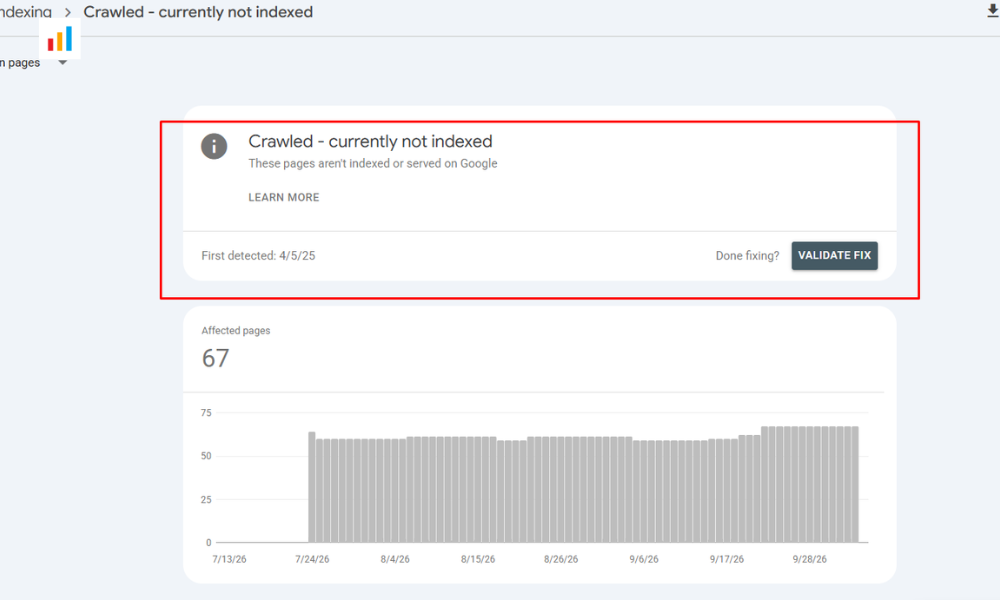
Now sort the URLs into groups: blog posts, pages, category pages, tags, parameters, feeds. Delete the ones you decided to ignore. What is left is your real to-do list.
Two questions will guide you from here:
- Is it one or two pages, or a large part of your site?
- Are the stuck pages all the same type (for example, all tags or all programmatic pages)?
A few stuck pages usually means a page-level issue. Hundreds of stuck pages usually means a site-level pattern, and we will come back to that later.
Step 2: Rule out technical problems
Technical causes aren’t the most common, but they are the fastest to check, and if you find one, the fix is clear.
Open URL Inspection in Search Console, paste the page URL, and click Test Live URL. Then click View tested page and look at the screenshot and the HTML.
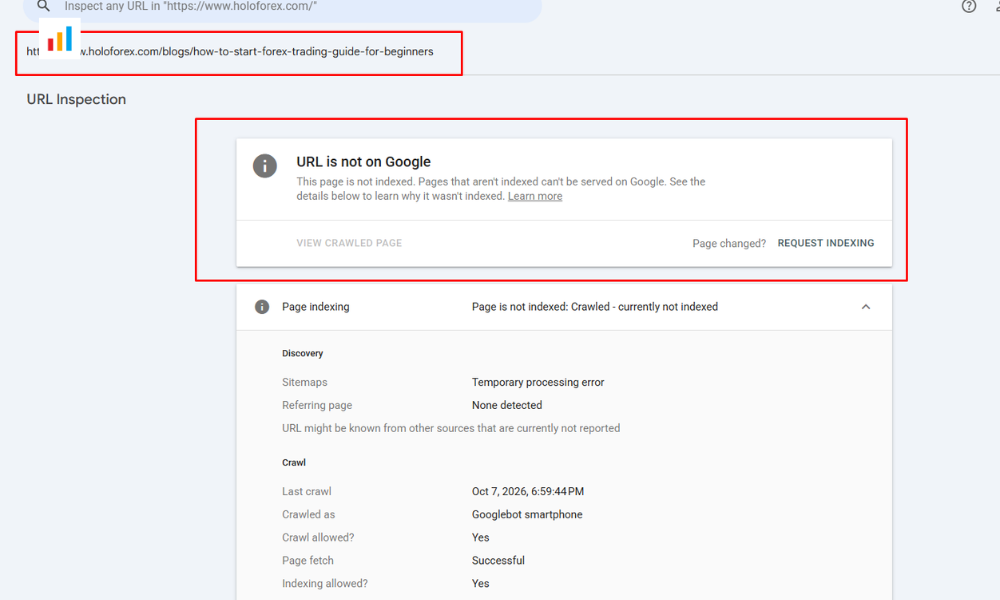
What you want to see: your real content, not a blank page, not just a heading, and not an error. If the tested page shows missing content, you have a technical problem. Check these things:
- A noindex tag. Look in the page source for <meta name=”robots” content=”noindex”>. Also check the HTTP header (X-Robots-Tag).
- robots.txt blocking important files. Open yoursite.com/robots.txt. A rule written to block tracking parameters can accidentally block the CSS and JavaScript files your theme needs, so Google sees a broken page.
- A wrong canonical tag. If the canonical points to another URL, Google may treat your page as a duplicate.
- Content loaded by JavaScript that fails. If your text only appears after a script runs, test it carefully.
- The WordPress “Discourage search engines” setting. Go to Settings → Reading and make sure it is unchecked.
- Redirect chains, server errors, or login walls in front of the page.
If Test Live URL shows your full content and none of these problems exist, the cause is almost certainly quality or site structure. Move on to Step 3.
Step 3: Check the quality of the page
This is the most common cause, and the hardest to hear. Google does not index everything it crawls. If your page repeats what many other pages already say, Google may decide it is not needed.
SEO professionals call this commodity content: content that almost anyone could write, because it just rewords what already exists. The opposite is content that brings something others do not have, such as first-hand experience, original data, or a clear point of view.
The “would anyone miss this page?” test
Search for the keyword your page targets. Open the top 5 results in separate tabs. Then ask yourself honestly:
- Does my page say anything the top results do not?
- Does it include something original, such as my own screenshots, numbers, examples or templates?
- If someone read the top 3 results, would they learn anything new from mine?
- Is the answer easy to find, or is it buried under a long introduction?
- Is the page clean to read, or crowded with ads, pop-ups, and filler?
If you answered “no” to the first three, that is probably why Google is holding the page back.
What commodity content looks like
| Commodity (easy to skip) | Useful (worth indexing) |
| “SEO is important for every business” | “I changed X on 12 pages and here is what happened” |
| Definitions copied in different words | A clear answer plus a real example |
| Stock images | Your own screenshots and diagrams |
| Long intro, answer at the bottom | Answer in the first paragraph |
| 10 tips anyone could list | Tips with proof, mistakes and results |
What about AI-written content?
Using AI to help is not the problem. The problem is publishing generic text that has no real experience behind it. If an article could have been written by anyone, about any site, it has little reason to be stored. If you use AI, treat it as a draft, then add your own experience, examples, and opinion.
A simple self-check: paste your article into an AI tool and ask, “Is this content generic, or does it show first-hand experience? Where is it weakest?” Then fix what it points out.
Be aware of the site-level effect
Google has said that when a site as a whole looks low in quality, it may crawl and index fewer of its pages. So if a lot of your pages are stuck, improving one post will not be enough. Look at the overall pattern: how many thin posts, mass-produced pages, or repeated topics do you have?
If you publish pages at scale (for example, programmatic SEO pages), this matters even more. I explain this in my guide on Programmatic SEO Trends 2026.
Step 4: Check for duplicate topics on your own site
Sometimes the competitor is you. If you have two or three posts that answer the same question, Google may pick one and leave the others out.
To check, search Google for:
site:yourdomain.com “your keyword”
If several posts appear for the same question:
- Pick the strongest post (the one with the most links and traffic).
- Move the best parts of the weaker posts into it.
- Set up a 301 redirect from each weaker URL to the strong one.
- Remove the redirected URLs from your sitemap.
Only merge pages that truly answer the same question. Two posts about related but different questions can both stay.
Step 5: Fix your internal links
Internal links tell Google which pages matter. A post with no internal links (an “orphan” page), or one hidden deep in your site, looks unimportant.
For each stuck page:
- Add at least 3 contextual links from related posts that are already indexed.
- Link to it from the relevant category or hub page.
- Keep it within about 3 clicks of the homepage.
- Use descriptive anchor text such as “fix crawled not indexed pages”, not “click here”.
To find orphan pages and see link counts, you can crawl your site with a tool like Screaming Frog (the free version covers up to 500 URLs), or use the internal link suggestions in your SEO plugin.
Step 6: Add something only you can offer
This is the step that makes the biggest difference for quality issues. Go back to the page and add first-hand value. Ideas that work:
- Your own screenshots from your tools, not stock images
- A mini case study with real before-and-after results
- A template, checklist or spreadsheet people can copy
- A section called “What I tried that did not work”
- An original comparison table or simple diagram
- Real numbers from your own sites or clients (only when you can share them)
- Updated information, with a visible “last updated” date
Also remove what weakens the page: long generic introductions, repeated points, filler paragraphs, and anything that pushes the answer far down the page.
Step 7: Request indexing once, then wait
After you have made real improvements:
- Open URL Inspection and paste the URL.
- Click Test Live URL and confirm your content shows.
- Click Request Indexing.
- Wait one to two weeks, then check the status again.
Submitting the same URL repeatedly does not speed things up. Resubmitting your sitemap does not fix this issue either, because Google already knows the page.
Note that recovery from a quality issue can take longer than two weeks. If you improved the page properly and it is still not indexed, keep strengthening it and your internal links, and check again after a few more weeks.
What Google has said about this status
You should not have to take my word alone, so here is what Google and Google-related sources have said. Where a point comes from someone else’s notes, I say so.
1. Google’s own help page. Google’s Page indexing report describes this status as a page that was crawled but not indexed, and says it may or may not be indexed in the future. So it is not a final decision. Source: Google Search Console Help, Page indexing report.
2. Google’s guidance on helpful content. Google asks publishers to check whether a page offers original information, reporting, research or analysis, and real added value compared with other pages in the results. These are the same questions as in Step 3. Source: Creating helpful, reliable, people-first content.
Should you improve, merge, noindex or delete?
Use this table to decide:
| Situation | What to do |
| Feed, pagination, parameter or empty tag page | Leave it alone. This is normal. |
| Good topic but thin or generic content | Improve it (Steps 3 and 6) |
| Two or more posts answer the same question | Merge into one and 301 redirect |
| Old page with no traffic, no links and no value | Delete it, or redirect it to a closely related page |
| Page users need but search does not (for example a filter page) | Use noindex or a canonical tag |
| Technical block found in Step 2 | Fix the cause, then request indexing |
WordPress-specific fixes
If your site runs on WordPress, check these:
- Settings → Reading: “Discourage search engines from indexing this site” must be unchecked.
- Rank Math or Yoast: check that your important posts and pages are set to index, and that thin archives (tags, authors, dates) are set to noindex if they have no original text.
- Category pages: if you want them indexed, add a real introduction of 100–150 words so they are more than a list of titles.
- Mass-produced or auto-generated posts: review them honestly. Merge, improve or remove the weak ones.
- Cache and minify plugins: a bad setting can break CSS or JavaScript for Googlebot. Test the live URL after changing them.
- Page builders and popups: heavy Elementor layouts or popups that cover the content can hurt the reading experience.
- Sitemap: your XML sitemap should only list pages you want indexed.
- robots.txt: open it and read every line. Remove rules that block theme files or important URLs.
My real example
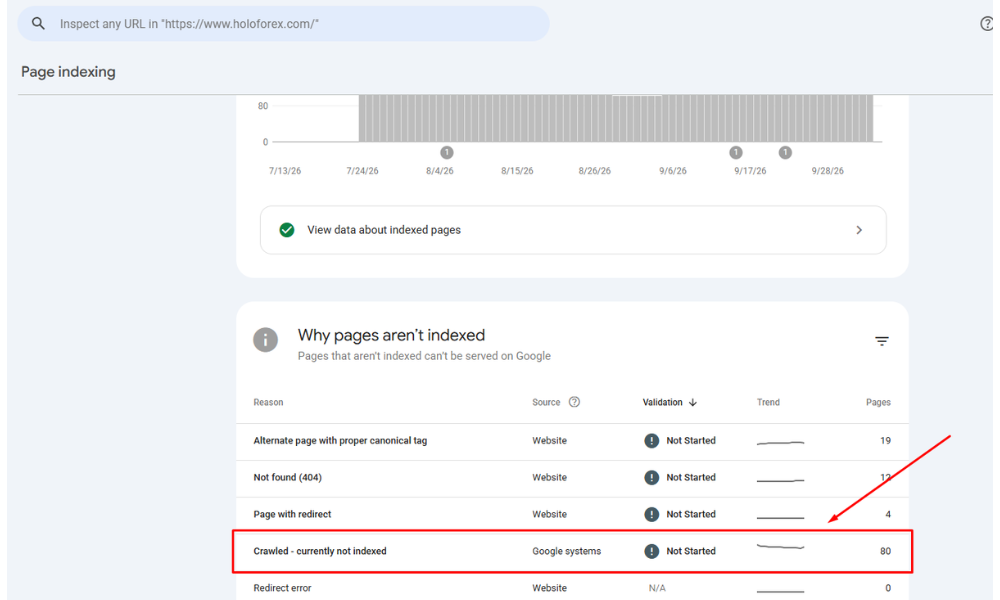
My real example
- Site and page: holoforex.com
- What I found:
- The content was not exceptional. It covered the topic in much the same way as pages that already rank, with little of my own experience in it.
- There were too few internal links, so the page was not well connected to the rest of the site.
- There were no statistics or data. Nothing showed the content was well researched, and there were no sources.
- The author bio and expertise were weak. Readers and Google could not clearly see who wrote the page or why they were qualified.
- What I changed: I fixed each of these problems.
- I rewrote the content and added my own examples, screenshots, or experience
- I added 2- 3 more internal links from related pages that were already indexed.
- I added statistics or data with links to the sources.
- I rewrote the author bio to clearly highlight the author’s expertise on the page.
- How long it took: almost 2 weeks to see a change.
- Result: the page was indexed and started getting its first impressions in Google Search.
Common mistakes to avoid
- Clicking Request Indexing over and over
- Resubmitting the sitemap and expecting it to fix a quality issue
- Changing the URL slug without a redirect, which creates a duplicate
- Publishing hundreds of generic pages (AI-written or not) and hoping some get indexed
- Deleting everything in panic, including pages that only need improvement
- Adding noindex to pages you actually want in search
- Using spam links or social signals to force indexing
- Ignoring the bigger pattern when many pages across the site are affected
Frequently asked questions
Is “Crawled – currently not indexed” a Google penalty?
No. It is not a manual action. It is a status that says Google visited the page and chose not to index it for now.
How long does it take to fix?
If the cause is technical, pages can be indexed within days after you fix it and request indexing. If the cause is quality, it can take several weeks or longer, and there is no guarantee.
Does the Request Indexing button work?
It can help Google look at the page again, but it does not force indexing. It works best after you have made real improvements. Use it once per update.
Can AI-generated content cause this status?
It can, when the content is generic and adds nothing new. AI-assisted content that includes real experience, examples and your own edits is a different case.
Can many unindexed pages hurt the rest of my site?
It can be a warning sign. If Google sees a site with a lot of low-value pages, it may crawl and index less of the site overall. Improving or removing weak pages helps.
Should I delete pages that are crawled but not indexed?
Only if the page has no value and cannot be improved. If the topic matters to your audience, improve the page and strengthen its internal links first.
Does resubmitting my sitemap help?
Not for this status. A sitemap tells Google that a URL exists, but Google has already crawled this one.
What is the difference between Crawled and Discovered – currently not indexed?
Discovered means Google knows the URL but has not visited it. Crawled means it visited and decided not to index. The fixes are different, as shown in the table above.
Is it normal to have some pages in this list?
Yes. Feeds, pagination, parameter URLs and thin archives often appear here, and you can usually leave them alone.
Final thoughts
Most of the time, “Crawled – currently not indexed” is Google’s way of asking one question: why does this page need to exist when there are already so many like it? The fix is rarely a trick. Rule out technical problems first, then make the page genuinely more useful, connect it well inside your site, and give Google time.
Want the checklist as a one-page file? [ADD YOUR DOWNLOAD LINK HERE]
I publish new guides on AI, SEO and marketing regularly. [ADD YOUR NEWSLETTER SIGNUP LINK HERE]
Related guides: [LINK TO YOUR TECHNICAL SEO CATEGORY] | [LINK TO ANOTHER RELATED POST]
About the author
Razu Ahmed Toha is a digital solutions strategist and the founder of Anbar Software. He has helped over 100 brands grow in local and international markets, and he shares what he learns about AI, SEO and marketing on Toha Knowledge.