
Picture a business owner in Dhaka. Sales are in one Excel file. Stock is in a notebook at the warehouse. Accounts are in Tally. HR is on WhatsApp. At month-end, nothing matches, and everyone blames someone else.
This is the problem an ERP system solves.
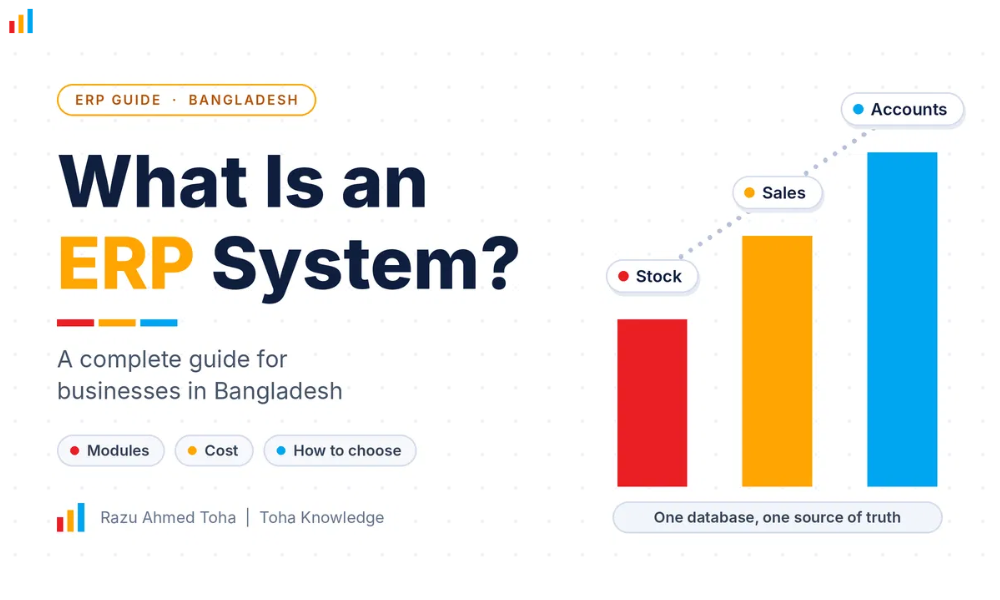
An ERP system (Enterprise Resource Planning) is one software platform that connects your accounts, stock, sales, purchasing, HR and reports in a single database, so every team works from the same real-time numbers.
In this guide, I will explain what ERP is in simple words, what it does, who needs it, how to choose one in Bangladesh, and the mistakes I see businesses make. Let’s go….
What Is an ERP System?
ERP stands for Enterprise Resource Planning.
Think of it as one shared brain for your whole business. When your sales team creates an order, your stock updates. When stock drops, purchasing sees it. When goods are delivered, accounts are updated. Nobody types the same data twice.
Without ERP, each team uses its own tool. Data lives in separate places, and someone has to join it manually. That is slow, and it creates errors.
With ERP, there is one source of truth.
One thing I want to clear up early: ERP is not only for big factories. Today, small and mid-size businesses use it too, especially cloud ERP, which you pay for monthly and access from a browser.
Looking for ERP software for your business? Explore this guide to discover ERP solutions suited to the needs of SMEs in Bangladesh.
How Does an ERP System Work?
An ERP has two parts.
- A central database. Every piece of business data is stored here once.
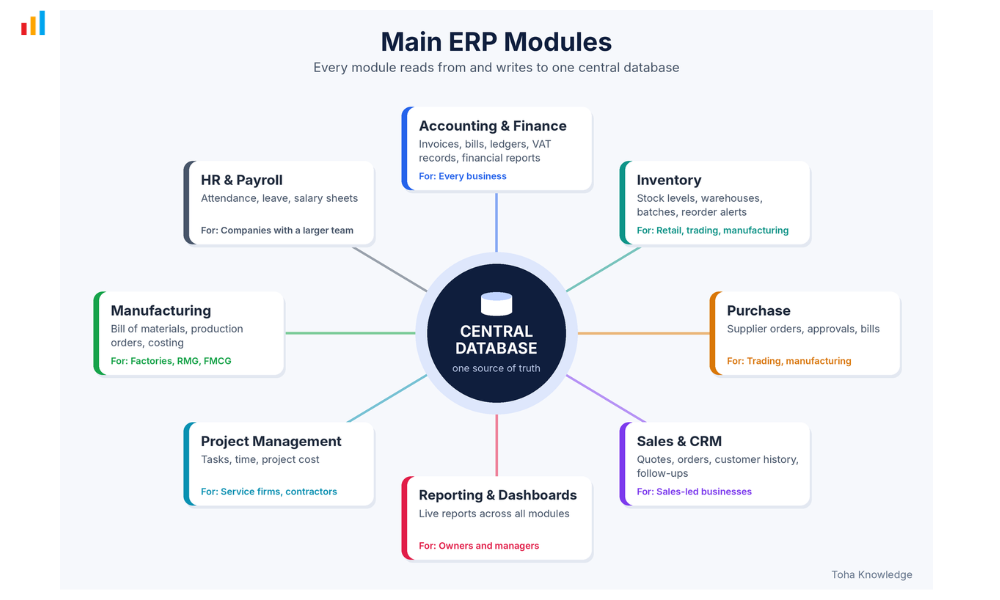
- Modules. Each module is a section of the software for one job, such as accounting or inventory. All modules read from and write to the same database.
Here is a simple example. A customer orders 100 units.
- Sales creates the order.
- Inventory checks stock and reserves the units.
- Purchasing gets an alert if stock is low.
- Accounting creates the invoice.
- The owner sees sales, stock levels, and cash position on one dashboard.
All of this happens without anyone copying data between files.
Main ERP Modules
You do not need every module. Most businesses start with 2 to 4 and add more later.
| Module | What it does | Who needs it most |
| Accounting and finance | Invoices, bills, ledgers, VAT records, financial reports | Every business |
| Inventory | Stock levels, warehouses, batches, reorder alerts | Retail, trading, manufacturing |
| Purchase | Supplier orders, approvals, bills | Trading, manufacturing |
| Sales and CRM | Quotes, orders, customer history, follow-ups | Sales-led businesses |
| HR and payroll | Attendance, leave, salary sheets | Companies with a larger team |
| Manufacturing | Bill of materials, production orders, costing | Factories, RMG, FMCG |
| Project management | Tasks, time, project cost | Service firms, contractors |
| Reporting and dashboards | Live reports across all modules | Owners and managers |
My advice: pick the module that hurts the most today. For many Bangladeshi businesses, that is inventory or accounting. Start there.
Why Do Businesses in Bangladesh Need ERP?
I see the same pain points again and again.
Excel and manual work. Excel is fine at the start. At 500 products, 5 staff members, and 2 branches, it breaks. Files get copied, edited, and lost.
No live view of stock and cash. Owners often find out about a stock problem after a customer has already complained.
Growth across branches or warehouses. Once you open a second location, you need one system, not two sets of records.
Records and compliance. VAT, audits, and bank requirements all need clean, traceable records. ERP keeps invoices, purchases, and stock movements in one trail. Check the current NBR requirements for your business type, since rules change.
Slow reports. If it takes your accountant 3 days to build a monthly report, you are making decisions on old data.
Staff errors and fraud risk. Approvals, user roles, and logs make it harder for mistakes and leakage to hide.
ERP for Different Industries in Bangladesh
The module mix changes by industry.
- RMG and garments: order tracking, production planning, costing, buyer and merchandising data, stock of fabric and trims.
- Manufacturing: bill of materials, production orders, wastage, raw material control.
- Retail and distribution: multi-branch stock, POS, sales by territory, collection tracking.
- Pharma and FMCG: batch and expiry tracking, distribution, dealer management.
- Trading and import: purchase, landed cost, stock and supplier payments.
- Real estate and construction: project cost, supplier bills, client installments.
- Education and service firms: billing, HR, project time tracking.
If an ERP vendor shows you a generic demo and never asks about your industry, be careful.
Types of ERP: Cloud, On-Premise and Hybrid
| Type | How it works | Pros | Cons |
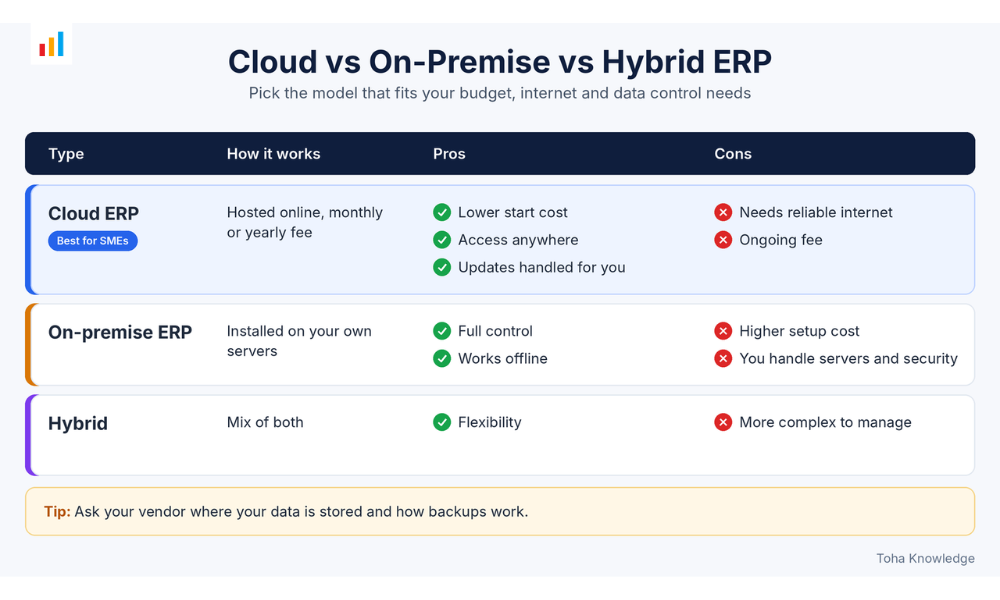
| Cloud ERP | Hosted online, monthly or yearly fee | Lower start cost, access anywhere, updates handled for you | Needs reliable internet, ongoing fee |
| On-premise ERP | Installed on your own servers | Full control, works offline | Higher setup cost, you handle servers and security |
| Hybrid | Mix of both | Flexibility | More complex to manage |
For most small and mid-size businesses, cloud ERP is the easiest start. Larger factories with strict data control or weak connectivity may prefer on-premises or hybrid. Ask your vendor where the data is stored and how backups work.
How Much Does ERP Cost in Bangladesh?
There is no single price. Cost depends on the parts below.
- License or subscription: per user per month for cloud, or a one-time license for on-premises.
- Setup and configuration: setting up modules, taxes, workflows, and reports.
- Customization: changes to fit your process. This is where budgets often grow.
- Data migration: cleaning and moving old data.
- Training: staff needs to actually learn it.
- Support and updates: ongoing help after go-live.
Two tips to control costs. First, start with the modules you need now. Second, ask for a fixed scope in writing, so extra requests do not quietly add up.
How to Choose the Right ERP (Checklist)
Before you sign anything, check these.
- Business fit: does it cover your core process, not just a nice demo?
- Must-have modules: list them first, then compare vendors against the list.
- Local needs: VAT and local reporting, BDT support, and Bangla where your team needs it.
- Integrations: can it connect with bKash, Nagad, your payment gateway, courier services, and your website or e-commerce store?
- Support in Bangladesh: who answers when something breaks, and how fast?
- Scalability: will it handle double your users and transactions next year?
- Ease of use: if your staff hate it, they will go back to Excel.
- Vendor track record: ask for references in your industry and call them.
- Data ownership: you should be able to export your data at any time.
ERP Implementation: The Steps
Implementation is where most projects win or fail.
- Define the problem. Write down what is broken today and what success looks like.
- Choose the vendor. Compare 2 to 3 options using the checklist above.
- Clean your data. Remove duplicates and fix product, customer, and supplier lists before importing.
- Configure. Set up modules, users, roles, taxes, and workflows.
- Train your team. Teach by job role, not as one big lecture.
- Pilot. Run a small group or one branch first.
- Go live. Switch over and keep the old system as a short-term backup.
- Review. After 30 to 60 days, fix what is not working and add modules.
Want to explore the leading ERP providers? Check out this guide to compare top ERP systems by market share and learn about the major players in the industry.
Common ERP Mistakes (and How to Avoid Them)
- Buying too big. A huge system your team cannot use is worse than a simple one they do.
- Skipping training. Most failed projects fail on people, not software.
- Bad data migration. Dirty data in means dirty reports out.
- No internal owner. Someone inside your company must lead the project. Do not leave it all to the vendor.
- Too much customization too early. Start with the standard setup, learn what you really need, then customize.
- Ignoring change management. Tell your team why you are doing this and what is in it for them.
Do You Need ERP? Quick Self-Check
Answer yes or no.
- Do you keep important data in several Excel files or tools?
- Do your stock numbers often not match reality?
- Does month-end reporting take days?
- Do you have more than one branch, warehouse, or sales channel?
- Do you struggle to see profit by product, customer, or project?
- Do staff re-enter the same data in different places?
- Are you planning to grow in the next 1 to 2 years?
- Do you need cleaner records for audits, banks, or investors?
ERP is not magic. It will not fix a broken process by itself. But when your business has outgrown Excel and scattered tools, a well-chosen ERP gives you one clear picture, fewer errors and faster decisions.
Start small. Pick the module that hurts most. Choose a partner who understands Bangladeshi business. And get your team involved early.
If you are not sure where to begin, book a free consultation with me, and we will map out what your business actually needs.
Frequently Asked Questions
What is ERP in simple words?
ERP is business software that connects your accounts, stock, sales, purchasing, and HR in one system, so all teams use the same live data.
Is ERP only for big companies?
No. Cloud ERP and modular systems let small and mid-size businesses start with just the modules they need.
How much does ERP cost in Bangladesh?
It depends on users, modules, customization, cloud or on-premise, and the vendor. Ask for quotes that separate license, setup, customization, training, and support so you can compare properly.
What is the difference between ERP and accounting software?
Accounting software handles money records. ERP covers accounting plus stock, sales, purchasing, HR, production, and more, all connected in one database.
How long does ERP implementation take?
A simple cloud setup can take a few weeks. Complex or manufacturing projects can take several months. Get a written timeline from the vendor.
Can ERP integrate with bKash, Nagad, or courier services?
Yes, an ERP system can integrate with payment services like bKash and Nagad, as well as courier services, depending on your business needs and the available integrations. If existing ERP software doesn’t offer the features you need, a custom ERP solution can be built around your business workflow. Contact me to discuss your requirements.
Is cloud ERP safe?
Good cloud providers use encryption, backups, and access controls. Ask where your data is stored, how often it is backed up, and how you can export it.