
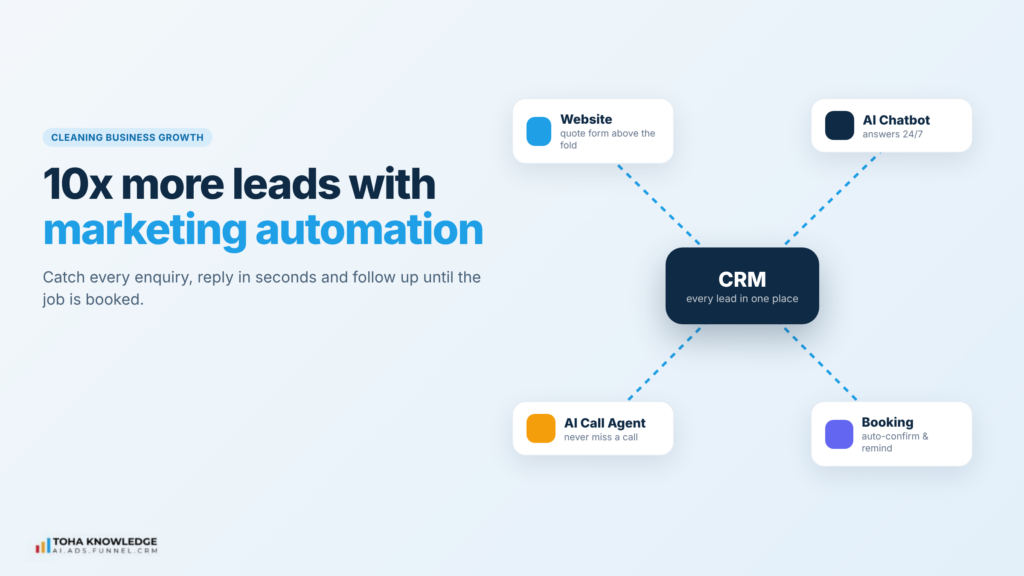
Most cleaning businesses don’t have a lead problem. They have a leak problem. The phone rings while the team is on a job. A quote request arrives at 9 PM and gets a reply the next afternoon. A happy customer books once and is never asked again.
Each of those is a lead you already paid for, and lost. Marketing automation fixes that by catching every enquiry, replying instantly and following up until the job is booked. That is how a cleaning business can get many times more booked leads from the same marketing budget.
Where cleaning businesses lose leads
Before you add anything new, look at where enquiries slip away today:
- Missed calls. Your team is cleaning, driving or with a customer. The caller doesn’t leave a voicemail. They call the next company.
- After-hours enquiries. Many people search for cleaners in the evening. If nobody answers until tomorrow, someone else gets the job.
- Slow quotes. A customer who waits a day for a price has time to get three other quotes.
- No follow-up. A quote is sent and never chased. Silence is treated as “no”, when often it means “busy”.
- One-time customers. A move-out clean or deep clean is never turned into a regular booking.
The 8 steps below close each of these gaps, in the order a lead travels: from the first visit to a recurring subscription.
In short
- Fix the website first. A clear, fast site with a quote form above the fold turns more visits into enquiries.
- Capture every channel. Forms, website chat and phone calls should all land in one CRM.
- Never miss a call. An AI call agent can answer, take the details and book while your team is on the job.
- Reply in seconds, not hours. Automatic texts and emails go out the moment a lead arrives.
- Follow up until they decide. A smart workflow chases quotes for you.
- Turn one-time jobs into subscriptions. Recurring cleaning plans are where the steady revenue is.
Step 1: Revamp your website into a conversion-focused site
Your website is where most leads start, so it has one job: get visitors to ask for a quote. A good-looking site that doesn’t do that is a brochure, not a sales tool.
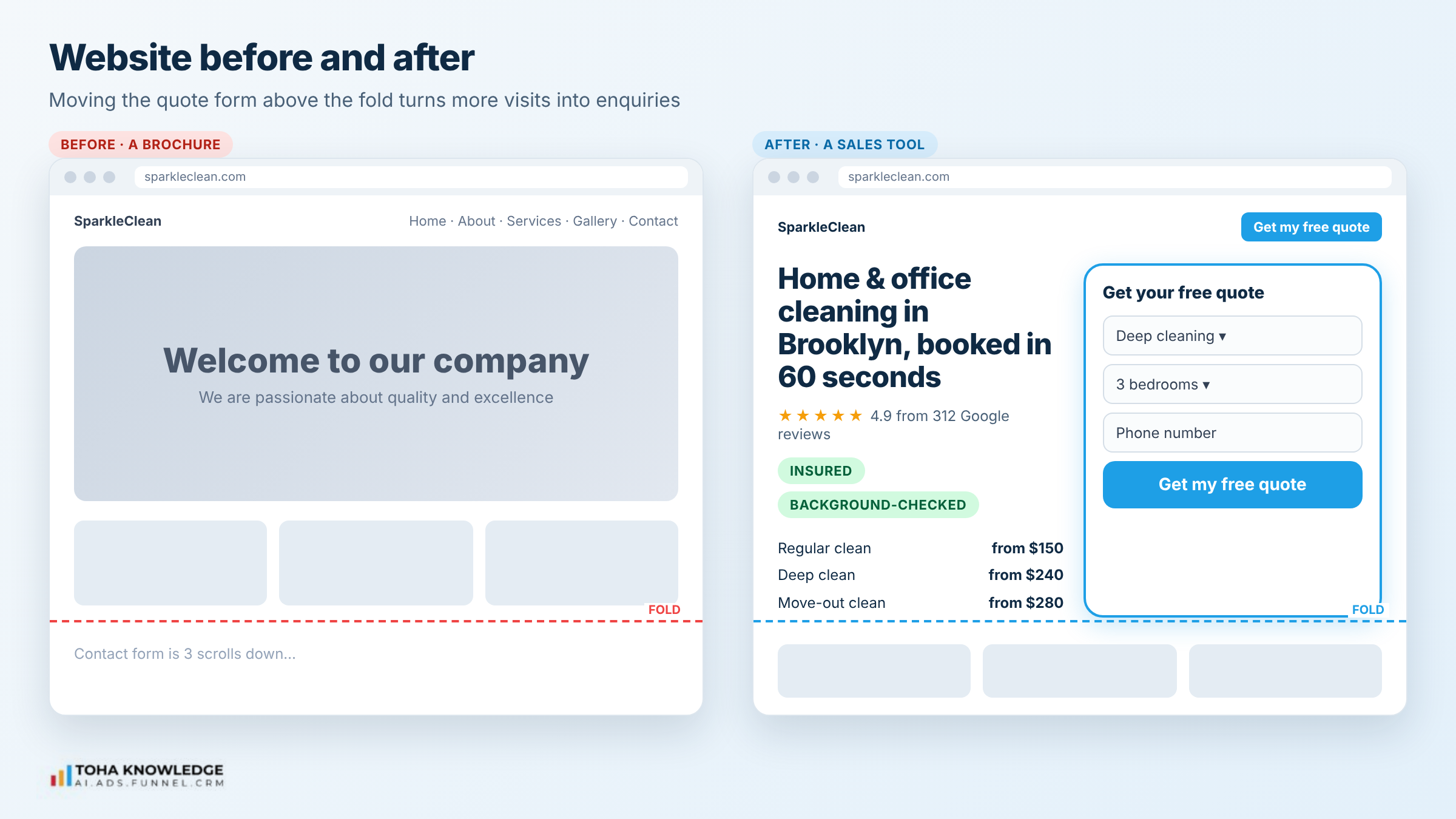
What a conversion-focused cleaning website has:
- A clear headline above the fold. Say what you clean, where, and the result. “Home and office cleaning in Brooklyn, booked in 60 seconds” beats “Welcome to our company”.
- The quote form on the first screen. Visitors should not have to scroll or hunt for a contact page.
- Services with starting prices. “Deep clean from $240” answers the first question every visitor has.
- Proof near the form. Google reviews, before-and-after photos, and badges like “insured and background-checked”.
- Fast on mobile. Most people looking for a cleaner are on their phone. Test your pages with PageSpeed Insights.
- One main button. “Get my free quote” on every page, in the same place.
Why this comes first: every other step in this guide depends on people actually filling in your form. If 100 people visit and only 1 asks for a quote, automation can only help that 1 person. If a better website gets 4 of them to ask, every step after this works four times harder.
Pages every cleaning website needs:
- A homepage that sends visitors straight to a quote.
- One page per service: regular cleaning, deep cleaning, move-in/move-out, office and commercial, post-construction. Each page targets its own Google searches, so you rank for more of them.
- One page per main service area, such as “House cleaning in Queens”. Local pages help you show up in “near me” searches.
- A reviews page that pulls in your real Google reviews.
- A simple FAQ that answers the questions customers ask on the phone: supplies, pets, keys, cancellations, insurance.
How the automation works on the website: the website is not just a page anymore. It is the front door of the system. Every button, form and chat window on it is connected to the CRM. A visitor’s clicks are tracked, so you know which page and which ad brought each lead.
How Toha Knowledge helps: we design and build conversion-focused websites for service businesses, with the quote form, service pages and local pages already connected to your CRM and automation. You get a site that is built to bring in enquiries from day one, not one you have to wire up later.
Step 2: Build a lead magnet form that grabs better leads
A plain “Contact us” form gets few submissions and vague messages. A lead magnet form gives people a reason to fill it in and gives you the details you need to quote.
Lead magnets that work for cleaning businesses:
- Instant price estimate. “Get your price in 30 seconds”: the visitor picks home size and service, and sees a price range.
- First-clean offer. “$30 off your first deep clean” in exchange for name, phone and email.
- Free checklist. “Move-out cleaning checklist to get your deposit back”, great for renters and property managers.
Ask the right questions, not too many. Name, phone, email, service type, property size and preferred date are usually enough. Each extra field means fewer people finish the form.
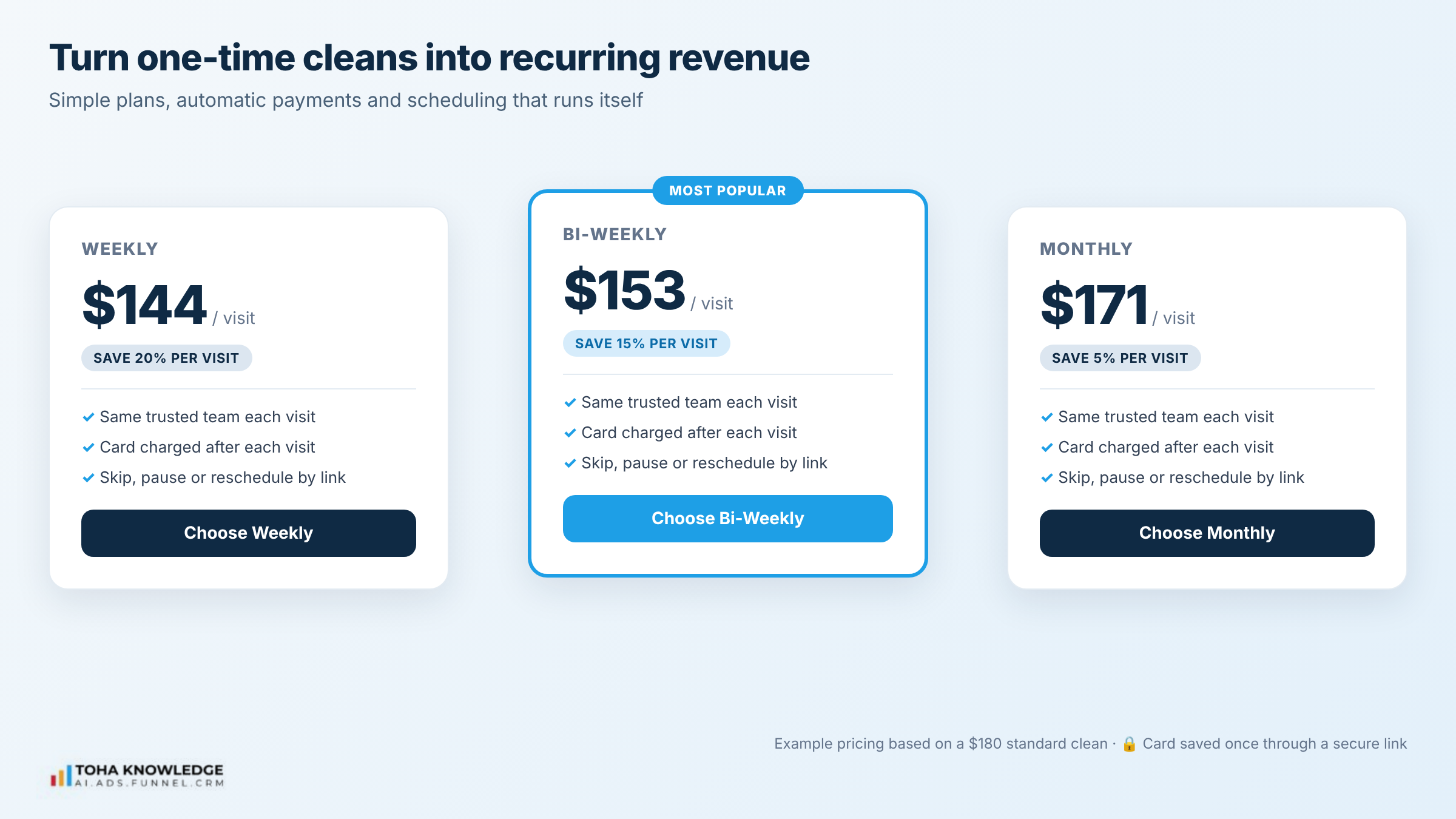
Use a multi-step form: easy questions first (service type, home size), contact details last. People who have already answered two questions are more likely to finish.
Why better leads matter as much as more leads: a form that only asks “name and message” brings enquiries like “How much?” with no details. Your team then has to call back, ask ten questions and hope the customer picks up. A smart form collects those answers upfront, so you can quote in minutes instead of days.
How the automation works with the form:
- The visitor picks a service and home size.
- The form shows a price range instantly, based on your price list.
- The visitor enters contact details to lock in the offer or get the exact quote.
- The lead is scored automatically. For example, a 4-bed deep clean with a date this week is marked “hot” and goes to the top of your team’s list.
- The lead magnet itself (discount code or checklist) is delivered by email and text within seconds.
Where to put the form: on the first screen of every page, as a pop-up when someone is about to leave, and as the main button in your Google Business Profile and Facebook ads.
Step 3: Connect your form to a CRM
A lead sitting in an email inbox is easy to forget. A lead in a CRM (customer relationship management system) is tracked from the first click until the job is done.
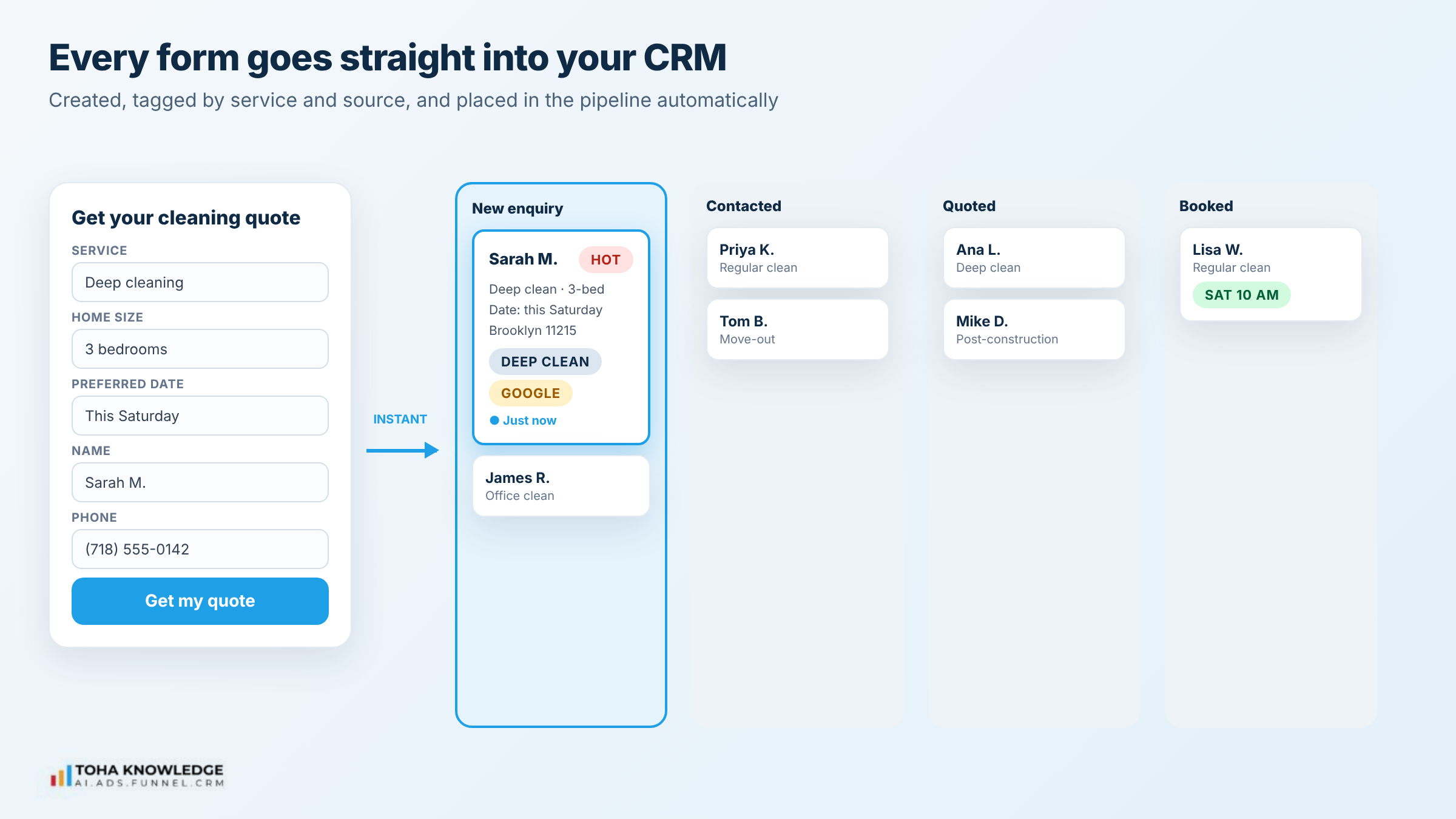
What happens when the form is connected:
- The visitor submits the form.
- A contact is created in the CRM with all their answers.
- The lead is tagged by service (deep clean, regular, move-out, office) and source (Google, Facebook, referral).
- The lead appears in your sales pipeline as “New enquiry”.
- Your team gets a notification, and the follow-up workflow starts (Step 7).
Tools like GoHighLevel do all of this in one place: forms, CRM, pipeline, texts and emails. Whatever you use, the rule is the same: every lead goes into one system, automatically, with no copy and paste.
Why one CRM changes everything: without it, leads are scattered across a Gmail inbox, a phone’s call log, Facebook messages and sticky notes. Nobody knows who replied to whom. With a CRM, every customer has one record with every form, chat, call, quote, booking and payment in it.
What your CRM pipeline should look like:
| Pipeline stage | What it means | What moves a lead here |
| New enquiry | Lead just came in | Form, chat or call creates the contact |
| Contacted | First reply sent | Instant auto-reply goes out |
| Quoted | Price sent | Quote is sent by text or email |
| Booked | Job is scheduled | Customer clicks “Approve & Book” |
| Completed | Clean is done | Team marks the job complete |
| Subscriber | On a recurring plan | Customer signs up for a plan |
Each move between stages can trigger its own automation. For example, when a lead moves to “Quoted”, the follow-up sequence in Step 7 starts. When it moves to “Completed”, the review request goes out. That is what makes the CRM the engine of the whole system.
Step 4: Capture leads with website chat and send them to the CRM
Not everyone wants to fill in a form. Some visitors just have one question: “How much for a 3-bedroom deep clean?” If nobody answers, they leave.
An AI chatbot on your website answers those questions 24/7, then collects the visitor’s details and sends them straight to your CRM.
What a good cleaning chatbot does:
- Answers common questions instantly: prices, service areas, what’s included, how long a clean takes, whether you bring supplies.
- Qualifies the lead: asks the service type, property size, location and preferred date.
- Collects contact details before giving a final quote or booking slot.
- Creates the contact in the CRM with the full chat history attached, so your team knows exactly what was asked.
- Hands over to a person when the question is unusual or the customer asks for one.
Tip: train the chatbot on your real price list, service areas and FAQs. A chatbot that guesses prices creates angry customers.
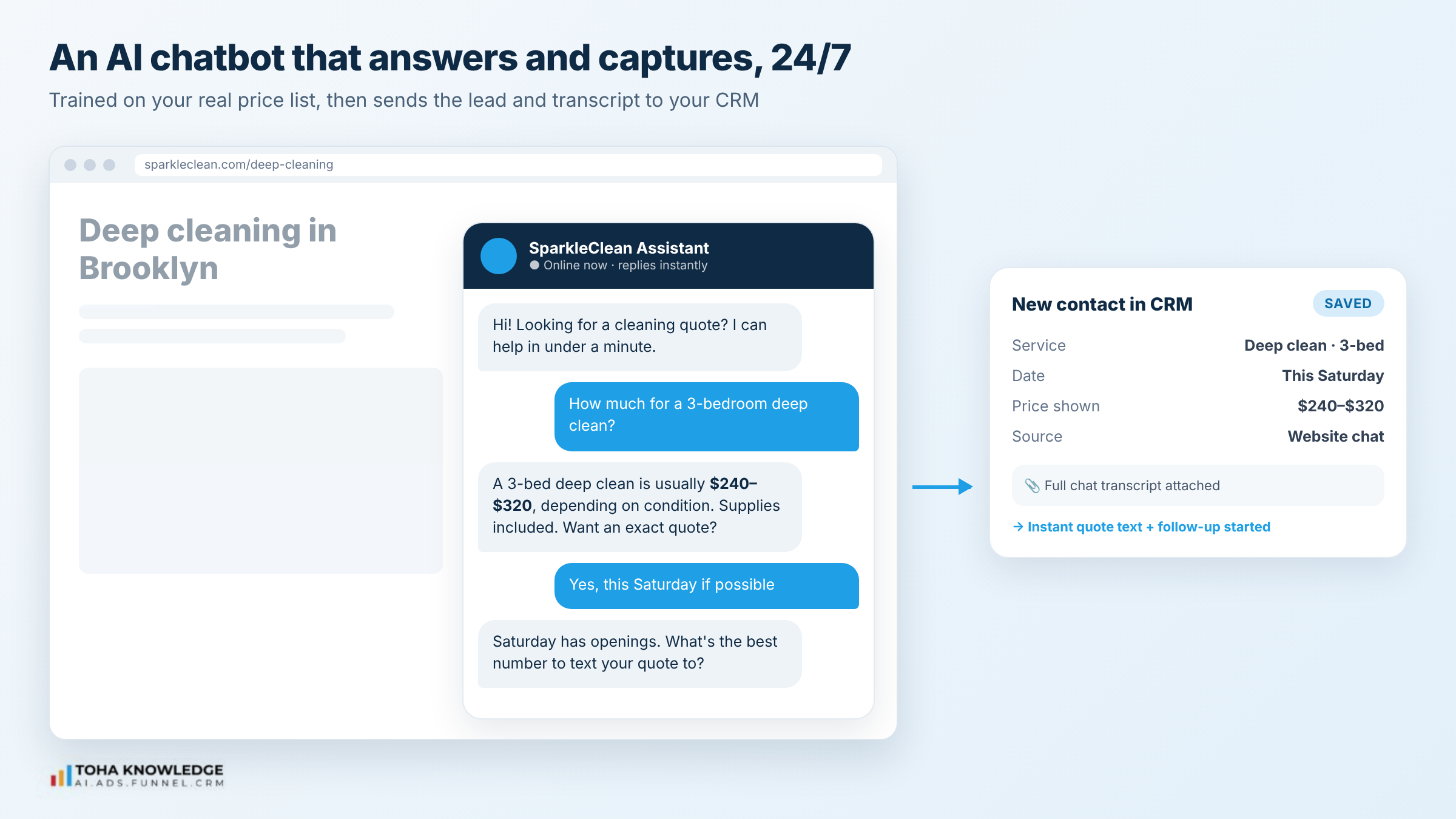
How the automation works behind the chat:
- Trigger: a visitor opens the chat or asks a question.
- The chatbot answers from your approved price list and FAQ.
- Once the visitor shows interest, it asks for name, phone and email.
- A contact is created in the CRM with the chat transcript and tagged “Source: Website chat”.
- The same instant reply and follow-up from Step 7 start, so chat leads get the same care as form leads.
- If the visitor asks for a person, your team gets an alert and can take over the chat from their phone.
Use the same chat everywhere. Many CRMs let one inbox handle website chat, Facebook Messenger, Instagram DMs, Google Business messages and SMS. Your team answers every channel from one screen, and the AI handles the first reply on all of them.
Step 5: Capture every phone call with an AI calling agent
For most cleaning businesses, the phone is still the biggest source of high-intent leads, and the biggest leak. When the team is on a job, calls go unanswered. Many callers don’t leave a voicemail. They just call the next company on Google.
An AI calling agent (also called an AI receptionist or voice agent) answers every call, day or night, in a natural voice.
What the AI calling agent does:
- Answers every call, including after hours and when your team is busy.
- Talks like a receptionist: greets the caller, asks what service they need, their address, home size and preferred time.
- Answers common questions about prices, services and availability.
- Books the job or a callback straight into your calendar.
- Logs the call in the CRM: contact details, a call summary, the full transcript and the recording.
- Alerts your team when a caller needs a person, for example a large commercial job.
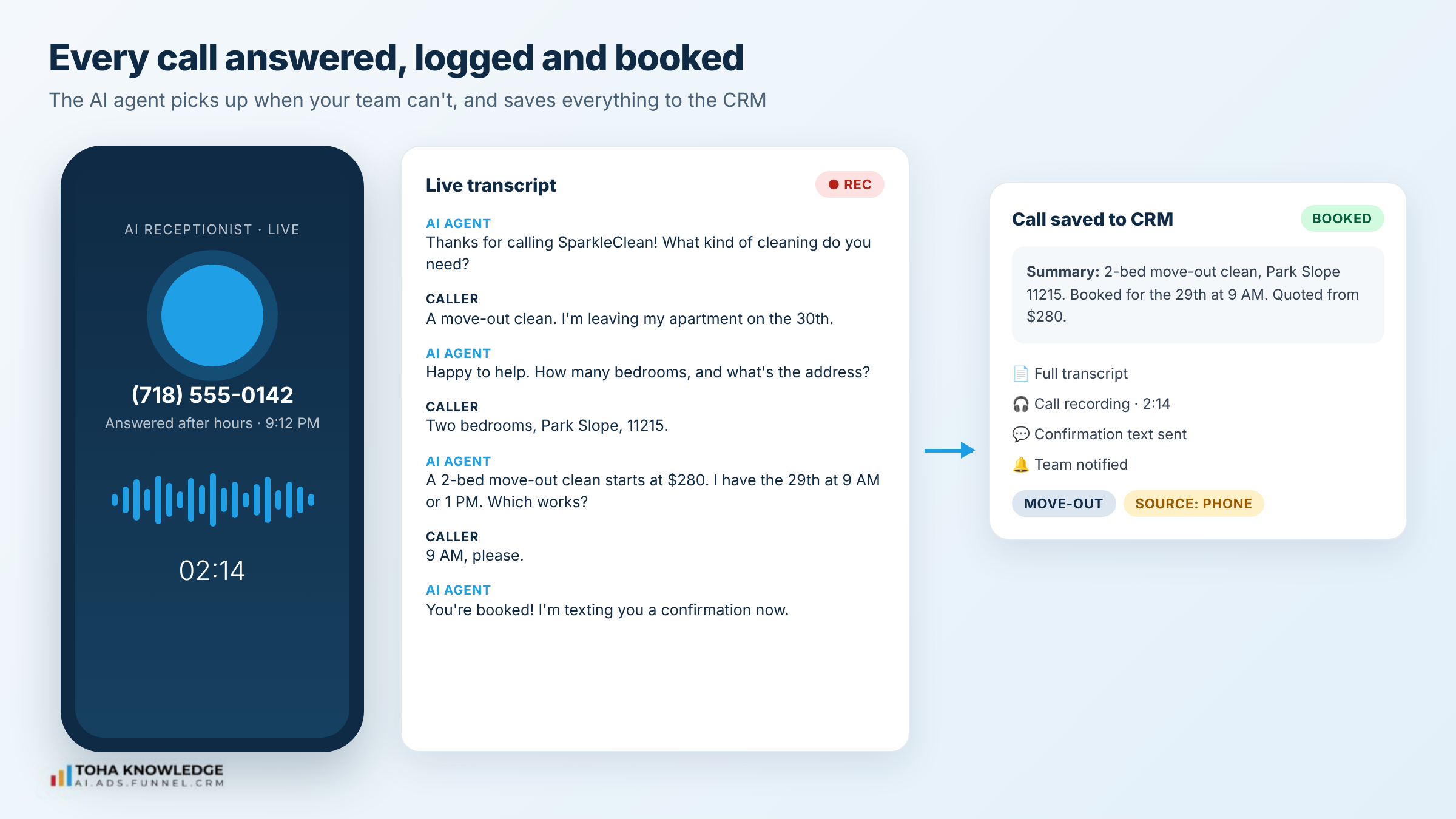
The result: no more missed-call list at the end of the day. Every caller becomes a contact with a full call history in the CRM, and your team can see exactly what was said before they call back.
How the automation works when someone calls:
- Trigger: a call comes in to your business number.
- If your team doesn’t pick up within a few rings, or it’s after hours, the AI agent answers.
- It has the conversation, collects the details and offers available booking slots.
- When the call ends, the CRM gets the contact, a short summary, the transcript and the recording.
- The caller gets a text right away: “Thanks for calling. Here’s a summary and your booking link.”
- Your team gets a notification with the summary, so a callback takes one minute, not ten.
Missed-call text-back as a backup. Even with an AI agent, set up an automatic text for any call that ends early: “Sorry we missed you. How can we help? Reply here or book online.” Many people who won’t call back will reply to a text.
How Toha Knowledge helps: we set up AI calling agents trained on your real services, prices, service areas and booking rules, and connect them to your CRM and calendar. We test the calls before going live, so your customers hear a helpful receptionist, not a confused robot.
Step 6: Send every booking to the CRM
A lead is not a customer until the job is booked. When bookings live in a separate calendar, a paper diary or someone’s phone, you lose track of who booked, who cancelled and who never heard back.
Connect your booking calendar to the CRM so every booking updates the customer record automatically.
How a connected booking flow works:
- The customer gets a quote by text or email with an “Approve & Book” button.
- They pick a date and time from your live availability.
- The system takes a deposit if you require one, for example $50 to hold the slot.
- The CRM moves the lead from “Quoted” to “Booked” in your pipeline.
- The customer gets an instant confirmation by text and email.
- Your cleaning team gets the job details: address, service, property size and notes.
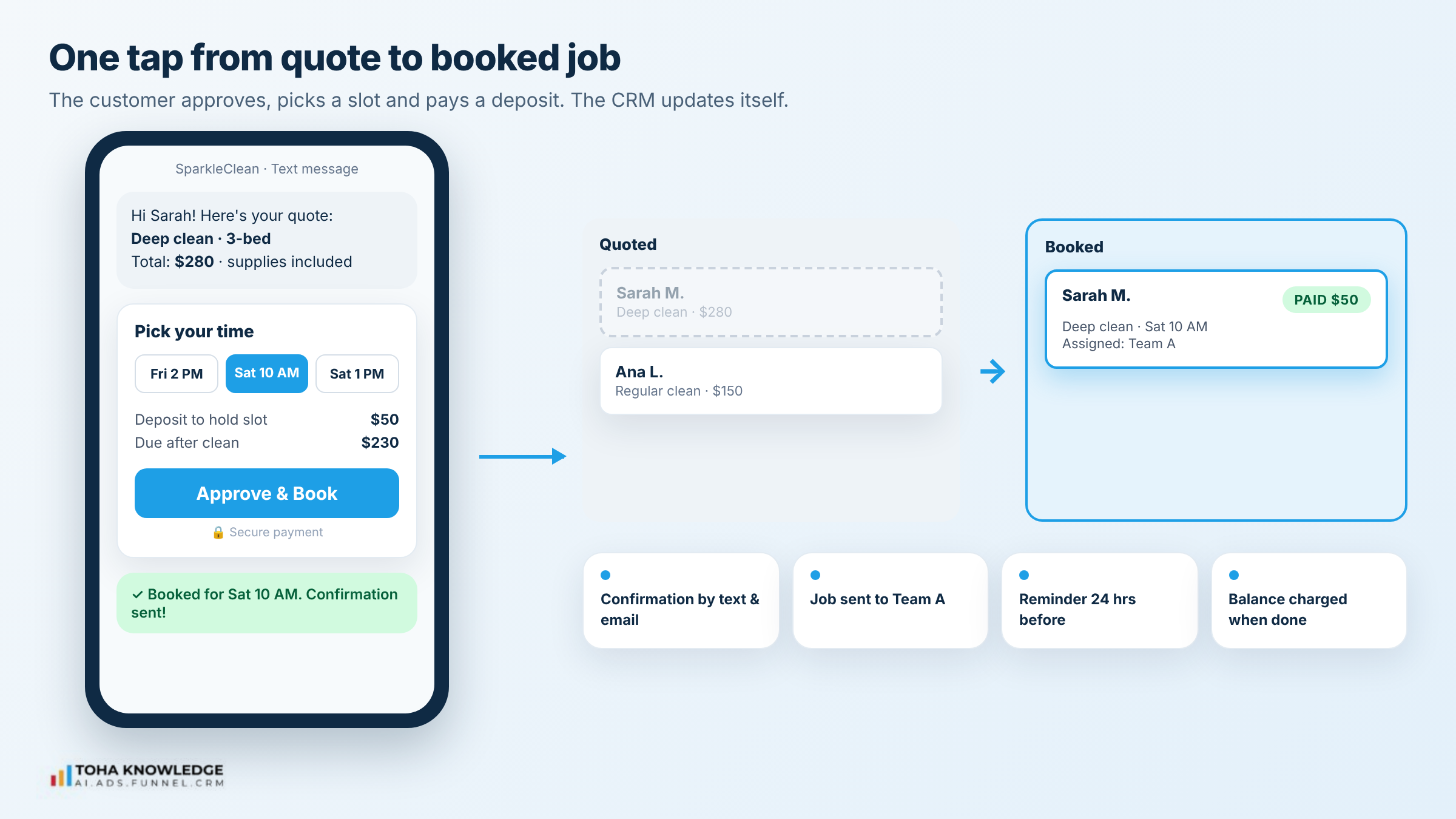
Now you can see your whole business in one place: how many enquiries came in, how many were quoted, how many booked, and where each one came from.
How the automation works after a booking:
- Instant confirmation by text and email, with the date, time, address and what to prepare (pets, keys, parking).
- Calendar invite added to the customer’s phone calendar.
- Team assignment: the job goes onto the right team’s schedule, and the team gets the address, service, home size and notes on their phone.
- Reminders: the customer gets a reminder 24 hours before, and a “your team is on the way” text on the day.
- Reschedule link: if the customer needs to move the clean, they do it themselves with a link, and the schedule updates for everyone.
- Deposit and payment: the deposit is recorded in the CRM, and the balance can be charged automatically when the job is marked complete.
This removes most of the back-and-forth phone calls that eat up an office manager’s day.
Step 7: Follow up with a smart workflow
Most lost cleaning jobs are not a “no”. They are a “not yet” that nobody followed up on. A smart workflow follows up for you, at the right time, on the right channel, and stops as soon as the customer replies or books.
The follow-up workflow, stage by stage:
| When | What the system does |
| Within 1 minute of an enquiry | Sends a text and email: “Thanks, we got your request. Here’s your quote / pick a time.” Alerts the team. |
| Quote sent, no reply after 1 day | Friendly text: “Any questions about your quote? Happy to help.” |
| Still no reply after 3 days | Email with reviews or before-and-after photos, plus the booking link. |
| Still no reply after 7 days | Last reminder with a small reason to act, such as an open slot this week. |
| Day before the clean | Reminder to the customer with time and what to prepare. |
| After the clean | Asks for feedback. A happy customer gets a review request. A problem goes straight to the manager. |
| A few weeks later | “Ready for your next clean?” with a rebooking link. |
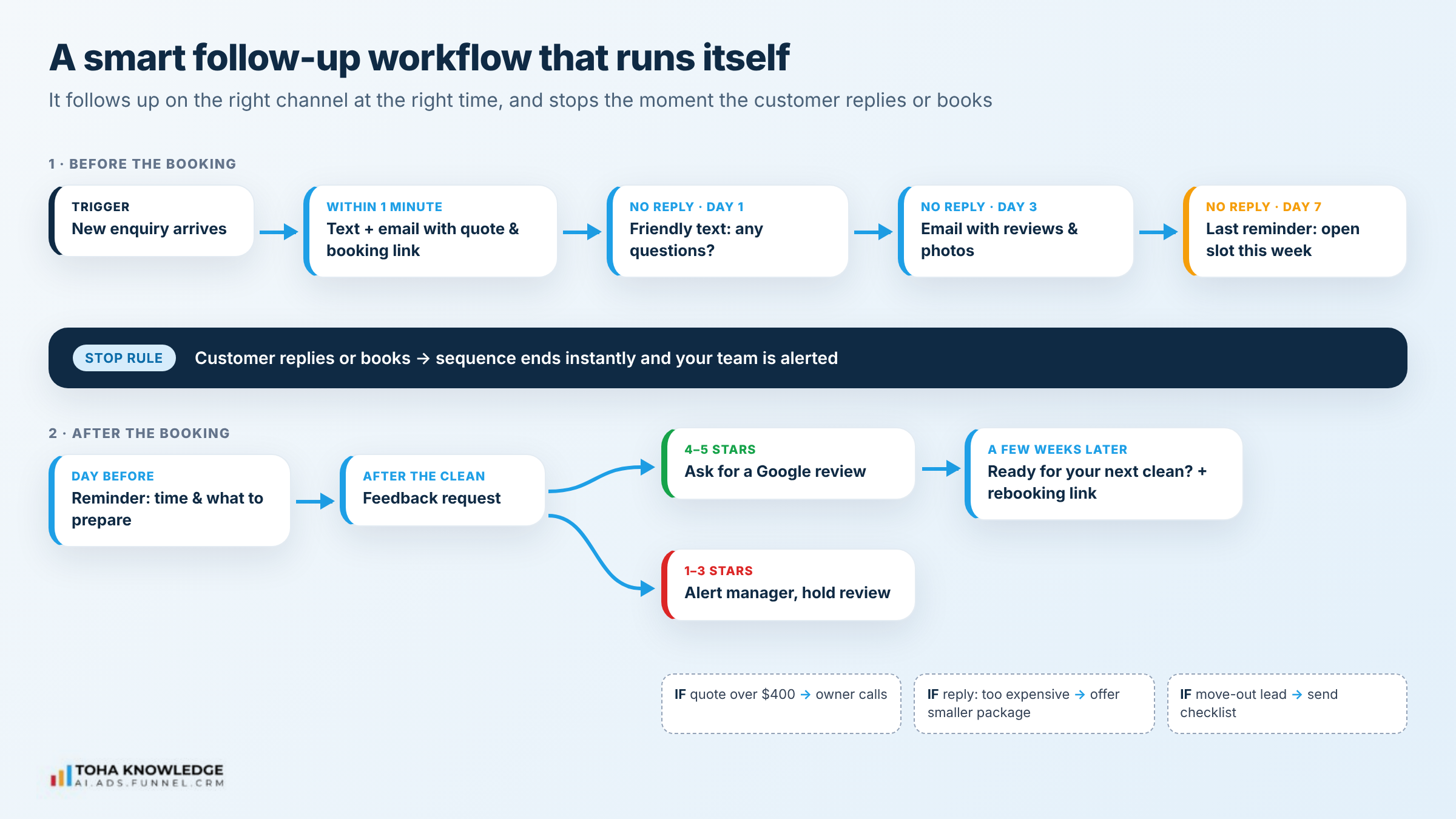
Make it smart, not spammy:
- Branch by service. A move-out lead gets different messages from an office cleaning lead.
- Stop when they reply. Any reply or booking ends the sequence and alerts your team.
- Use the customer’s details. Name, service and date make a message feel personal.
How the smart workflow decides what to send: a workflow is a set of “if this, then that” rules running in the background. For example:
- If the lead came from a move-out form, then send the move-out checklist and mention flexible dates.
- If the quote is over $400, then alert the owner to call personally.
- If the customer opens the quote email but doesn’t book, then send a text the next morning.
- If the customer replies “too expensive”, then tag them and offer a smaller package.
- If the feedback score is 4 or 5 stars, then ask for a Google review. If it’s 1 to 3, then alert the manager and hold the review request.
Nobody on your team has to remember any of this. The system does it for every lead, every time, at any hour.
How Toha Knowledge helps: we map your sales process, then build these workflows for you, with messages written in your brand’s voice. Before anything goes live, we test every path, so no customer gets the wrong message or three texts at once.
Step 8: Manage subscriptions for recurring revenue
A one-time clean is a job. A weekly or monthly plan is a business. Recurring customers are cheaper to keep than new ones are to find, and they make your schedule and income predictable.
How to set up cleaning subscriptions:
- Offer simple plans: weekly, every two weeks and monthly, with a lower price per visit for more frequent cleans.
- Pitch the plan at the right time. The best moment is right after a great first clean, in the feedback message.
- Take automatic payments. Customers save a card once and are charged after each visit or each month.
- Schedule automatically. Recurring jobs go straight onto the team calendar, with reminders before each visit.
- Handle changes without phone calls. Customers can skip, pause or reschedule through a link.
- Win back cancellations. When someone pauses or cancels, a workflow checks in a few weeks later with an offer to restart.
Track your subscription numbers in the CRM: active plans, monthly recurring revenue, and how many customers cancel each month.
How the automation runs a subscription:
- Trigger: a customer gives a 5-star feedback score after their first clean.
- They get an offer: “Keep your home this clean every two weeks and save 15% per visit.”
- They pick a plan and save a card through a secure link.
- The CRM tags them “Subscriber”, creates the recurring jobs and assigns the team.
- Before each visit, they get a reminder with an option to skip or reschedule.
- After each visit, the card is charged and a receipt is sent automatically.
- If a payment fails, the customer gets a polite text with a link to update their card, and your team is alerted.
- If they cancel, a win-back message goes out after a few weeks.
The result is steady, predictable income that keeps coming in without your team chasing anyone.
Read our guide: Marketing Automation vs CRM– What Is the Difference
The full system at a glance
Put together, the 8 steps turn a scattered set of tools into one system, where every lead is caught, answered, booked and kept.
| Stage | Before automation | After automation |
| Website | Pretty, but few enquiries | Quote form on the first screen, clear prices |
| Enquiries | Emails, calls and DMs in different places | Every lead in one CRM, tagged by service and source |
| Phone | Missed calls while the team is busy | AI agent answers every call and logs it |
| Reply time | Hours or the next day | Under a minute, by text and email |
| Quotes | Sent once, never chased | Automatic reminders until they book or say no |
| Bookings | Paper diary or separate calendar | Booked, paid and scheduled in the CRM |
| Repeat business | One-time jobs | Subscriptions with automatic billing |
One lead, start to finish: how it all runs on its own
Here is what the system does for a single customer, with no one on your team lifting a finger until the clean:
- 9:12 PM, Tuesday. Sarah searches “deep cleaning near me” and lands on your service page.
- 9:13 PM. She asks the chatbot what a 3-bed deep clean costs. It answers and asks for her details.
- 9:14 PM. She’s added to the CRM as a new enquiry. She gets a text and email with her quote and a booking link.
- 9:15 PM. Your team gets a notification, but nobody needs to act tonight.
- Wednesday, 10 AM. She hasn’t booked, so the workflow sends a friendly reminder text.
- Wednesday, 10:40 AM. She clicks “Approve & Book”, picks Saturday and pays a $50 deposit.
- Instantly. The CRM moves her to “Booked”, the job lands on Team A’s schedule, and she gets a confirmation.
- Friday. She gets a reminder with what to prepare.
- Saturday. The team does the clean and marks it complete. The balance is charged automatically.
- Saturday evening. She gets a feedback request, rates 5 stars and is asked for a Google review.
- Monday. She gets an offer to switch to a bi-weekly plan, and signs up.
That is one lead turned into a review and a recurring customer, fully automated, while your team focused on cleaning.
How Toha Knowledge helps: we build this complete system for cleaning and home service businesses, from the conversion-focused website to the CRM, AI chat, AI calling agent, booking, workflows and subscriptions. Everything is connected and tested, and your team gets training on how to use it.
Numbers to track
To know the system is working, check these every month:
- Leads by source: website form, chat, phone and referrals.
- Missed calls: this should drop close to zero.
- Average reply time to new leads.
- Quote-to-booking rate: how many quotes become booked jobs.
- Active subscriptions and monthly recurring revenue.
- Reviews per month, since more reviews bring more leads from Google.
Mistakes to avoid
- Automating a weak website. If the site doesn’t convert, automation only speeds up a small number of leads. Do Step 1 first.
- Too many form fields. Ask only what you need to quote.
- A chatbot or call agent that guesses. Give it your real prices and service areas, and a way to hand it over to a person.
- Follow-ups that never stop. End the sequence as soon as the customer replies or books.
- Tools that don’t talk to each other. If your team copies leads from one app to another, leads will fall through the gaps.
FAQ
What is marketing automation for a cleaning business?
It is a system that captures enquiries from your website, chat and phone, replies instantly, follows up and books jobs automatically, all tracked in one CRM.
Can automation really bring 10x more leads?
It depends on how many leads you lose today. Automation mainly helps you capture and convert enquiries you are already getting but missing, such as unanswered calls, after-hours requests and quotes nobody followed up. Businesses with many missed calls and slow replies usually see the biggest jump.
Will an AI calling agent sound robotic to my customers?
Modern AI voice agents speak naturally and can answer common questions, take details and book jobs. Set it up with your real information, and let it pass complex calls to your team.
What CRM is best for a cleaning business?
Choose one that combines CRM, forms, calendar booking, text and email, and workflows in one place, so leads never have to be copied between apps. GoHighLevel is a popular all-in-one option for service businesses.
How long does it take to set up?
A basic version, with a form, CRM and instant reply, can be live in days. A full system with website redesign, chatbot, AI calling and subscriptions usually takes a few weeks.
Do I need to change my website?
If your site is slow, unclear or hides the quote form, yes. Automation works best when the website already turns visitors into enquiries.
Conclusion
You don’t need more marketing to grow a cleaning business. You need to stop losing the leads you already have. Start with a website that converts, capture every form, chat and call in one CRM, reply in seconds, follow up automatically, and turn good first cleans into subscriptions.
Do that, and the same marketing budget brings in many more booked jobs.
Want this system for your cleaning business? Toha builds conversion-focused websites and complete automation systems for service businesses. Book a free strategy call and we’ll map out where you’re losing leads today.